Stay informed and never miss an Core update!
Thank you! Your submission has been received!
Oops! Something went wrong while submitting the form.


Artificial intelligence agents, a new technological revolution that is changing the software ecosystem, as we knew it
We can say that the year 2025, in terms of technology, was practically focused on a single topic: Artificial Intelligence, and within this, mainly on artificial intelligence agents (Agentic AI).
Beyond the advertising spiral of analysts and companies in the market, the reality is that artificial intelligence agents are a technological disruption that is strongly changing business applications as we know them today, fundamentally because this new technology makes it possible to modernize the way of executing the business logic of these applications, making them more autonomous.
This is the first of a series of articles about our humble experience with the development of artificial intelligence agents carried out during 2025 to test concepts and real business solutions built for customers, based on different frameworks, such as: Akka, Langchain and Microsoft Autogen.
There are numerous articles that explain in depth what an artificial intelligence agent is, the different frameworks and the way in which they solve different types of needs.
In this series of articles, we will mainly describe what the business requirements were, how we solved some of the challenges presented to us with existing patterns, and some of the lessons learned.
In the first and second parts of this series, we'll focus on an implementation using the AutoGen framework, mainly for research and experimentation. In the third and fourth parts, we'll discuss considerations for real and productive environments and demonstrate an experience with Akka. Finally, in the fifth part, we'll showcase an implementation using the Langchain framework. Part I follows.
PART I:
Our first challenge was a proof of concept for a public sector client in Argentina who needed to optimize their capacity to serve citizens through AI due to a legislative change at the national level, which generated a strong increase in the number of claims related to vehicle ownership in transactions involving the purchase or transfer of a car.
Basically, for this entity, the number of procedures to be handled increased from about 3,000 a year to 1,500 a day, that is, an increase of almost 200 times. And for this reason, it was requested to automate the “vehicle ownership report” processing flow using AI.
Use Case: Automate the processing of “Vehicle History Report” procedures to avoid human intervention in the reading and analysis of vehicle titles.
The challenge had the following requirements:
Functional:
Non-Functional:
Based on the above requirements, for this proof of concept we chose the framework of Microsoft AutoGen and the language models (LLMs) of Ollama.
Below, we list the frameworks, libraries and languages used:
The first approach was to design a simple workflow, with two sequential steps, executed by intelligent agents: two of the “assistant” type, that is, agents that are prepared to solve tasks using LLMs, where the first, called ocr_Agent, is responsible for extracting text from “Vehicle Title” documents.
A second agent, called Formatter_agent, is responsible for generating the results of extracting the first agent in a pre-established output format.
The third agent of the “user proxy” type that we call User_proxy, and whose function is to allow interacting with a user, executing code and providing feedback to other agents.
A specific feature of AutoGen is that it is a multi-agent conversation framework, that is: it uses conversable agents, who in addition to having a specific role, can Chat or pass messages to each other to start or continue a conversation.
However, one of the first challenges we faced was to be able to correctly read and interpret the information contained in the “Vehicle Title” documents, which contain data related to the ownership and identification of the vehicle in a key-value scheme.
Below is an example of a digital Automotive Title document with certain texts hidden for privacy reasons.
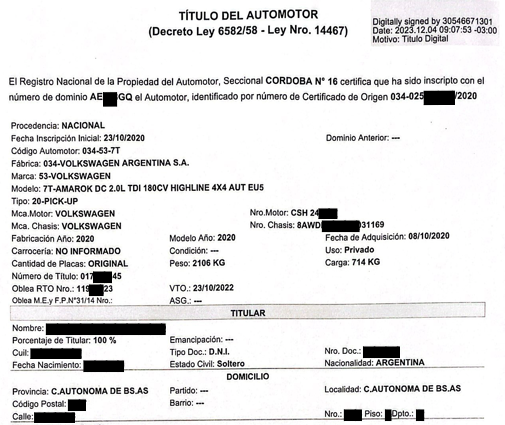
As can be seen, key-value pairs are found in different sections and areas of the document. We will see that this makes the OCR reader's task difficult.
For the OCR agent, which requires reading image files and extracting data from the car's title, in the first instance, we chose a library called Ollama.chat, but since it didn't support PDF files, we chose another Ollama library called OCR Processor, a modern python package that uses state-of-the-art vision language models to extract text from images and PDFs.
Among the advantages of this package, we can highlight, first of all, that it supports as input several vision models or VLMs, which are multimodal models that take text and images or videos as input and produce text as output, generally in the form of descriptions of images or videos, answering questions about their content. These models can be run locally. It also supports different output formats such as: text, markdown, JSON, key-value, etc.
In addition, it allows you to process multiple files in a batch processing scheme.
And finally, it allows you to modify the Prompt to give personalized text extraction instructions.
To encapsulate the extraction functionality as a tool, we define a function called run_ocr that uses the package OCR Processor and is invoked from the intelligent agent ocr_agent. Remember that assistant-type agents only interact with LLMs models and cannot execute code on their own, so that task is delegated to the User_proxy agent.
In summary, the workflow has the following sequence:
User_Proxy -> OCR_Agent -> User_Proxy: run_ocr () -> OCR_Agent -> Formatter_Agent -> User_Proxy
Another relevant consideration is that we can use different language models, depending on the functions and agents involved. In this case, we use a vision model or VLM “qwen2.5vl:7b” to extract data, and a text model or LLM: “call3. 2:3 b” to interpret the responses of each agent.
As for the Prompt of this agent, since its function is to extract the data as it can recognize it, it reinforces the fact that it does not change anything or infer something that is not explicitly in the document.
Another point to highlight is that, although the texts to be extracted are in Spanish, according to the tests carried out, we discovered that if we used Prompts In English the agent's response was faster, so we wrote all the Prompts in English.
Next, the definition of the function using the vision model, and the custom prompt to extract text as it recognizes them.
def run_ocr(file_path: str) -> str:
       ocr = OCRProcessor(model_name='qwen2.5vl:7b')
       result = ocr.process_image(
           image_path=file_path,
           format_type="text",
           custom_prompt=""" Extract all visible text from this image in Spanish **without any changes**.
                   - **Do not summarize, paraphrase, or infer missing text.**
                   - Retain all spacing, punctuation, and formatting exactly as in the image. - If the text is unclear or partially visible, extract as much as possible without guessing.
                   - **Include all text, even if it seems irrelevant or repeated.** """, # Optional custom prompt
           language="Spanish"
       )
       return result
Then, to help identify the key texts that we are interested in extracting as key-value, we use as instructions a specific prompt for the ocr_agent agent:
OCR_tasks = [""" Extract text from file provided, and provide it in raw text format by invoking the 'run_ocr' tool.
       - The value for the key 'Dominio' is located after the words 'número de dominio' in the paragraph that starts with 'El Registro Nacional de la Propiedad del Automotor'.
       - The value for the key 'Nombre Titular' is located after the word 'Nombre:' from the section "TITULAR" only.
       - The value for the key 'Cuil' is located after the word 'Cuil:' from the section "TITULAR".
       - The value for the key 'Nro. Doc.:' is located after the word 'Nro. Doc.:" from the section "TITULAR" only.
       - Extract the rest of the key-values you find in the text:""",
]
As for the second Formatter_Agent agent, its function is to present the results obtained by the OCR_Agent in a JSON output format according to a predefined structure so that another external module or service can use it to complete the domain report. This agent is instructed by the following prompt:
Formatter_tasks = [""" You must format the text from the OCR text extraction to a JSON output.
       - Format the response as JSON, **strictly preserving** the results from the extraction, do not change or guess any value.
       - In the case one value is not readable or not present, put "" as value.
       - Output your response in the following JSON format
                   {
                       "Dominio" : "value",
                       "Datos del vehículo" : {
                           "Fabrica": "value",
                           "Marca" : "value",
                           "Modelo" : "value",
                           "Nro motor" : "value",
                           "Nro chasis" : "value",
                           "Fabricación año" : "value",
                           "Fecha Incripcion inicial" : "value"
                           },
                       "Titular" : {
                           "Nombre" : "value",
                           "Porcentaje del Titular" : "value",
                           "Cuil" : "value",
                           "Tipo Doc." : "value",
                           "Nro. Doc." : "value",
                           "Fecha Nacimiento" : "value",
                           "Estado civil" : "value"
                           },
                       "Domicilio" : {
                           "calle" : "value",
                           "Nro." : "value",
                           "Piso" : "value",
                           "Dpto." : "value"
                       }
                   }
       - Reply TERMINATE when the task is done.""",
]
Finally, to start the sequence of the agents' workflow, we start the conversation or chat between them as follows:
chat_results = user_proxy.initiate_chats(
   [
       {
           "recipient": ocr_agent,
           "message": OCR_tasks[0],
           "clear_history": True,
           "silent": False,
           "max_turns": 2,
           "summary_method": "last_msg",
       },
       {
           "recipient": formatter_agent,
           "message": Formatter_tasks[0],
           "silent": False,
       },
   ]
)
As can be seen, to contain and prevent agents from chatting indefinitely, we limit calling the ocr_agent agent to two (2) executions.
The full source code (< 120 lines) of these AI agents is detailed below:
import autogen
from autogen import register_function
from ollama_ocr import OCRProcessor


file_path = "./data/example.pdf"


# CONFIG_LIST file should be a JSON array of LLM configurations, for example:
#[{
#        "model": "llama3.2:3b",
#        "base_url": "http://localhost:11434/v1",
#        "api_key": "ollama",
#        "price": [0, 0]
#}]


config_list = autogen.config_list_from_json(env_or_file="CONFIG_LIST")
llm_config = {"config_list": config_list, "cache_seed": None,"temperature": 0.0,}

OCR_tasks = [""" Extract text from file provided, and provide it in raw text format by invoking the 'run_ocr' tool.
       - The value for the key 'Dominio' is located after the words 'número de dominio' in the paragraph that starts with 'El Registro Nacional de la Propiedad del Automotor'.
       - The value for the key 'Nombre Titular' is located after the word 'Nombre:' from the section "TITULAR" only.
       - The value for the key 'Cuil' is located after the word 'Cuil:' from the section "TITULAR".
       - The value for the key 'Nro. Doc.:' is located after the word 'Nro. Doc.:" from the section "TITULAR" only.
       - Extract the rest of the key-values you find in the text:""",
]


Formatter_tasks = [""" You must format the text from the OCR text extraction to a JSON output.
       - Format the response as JSON, **strictly preserving** the results from the extraction, do not change or guess any value.
       - In the case one value is not readable or not present, put "" as value.
       - Output your response in the following JSON format
                   {
                       "Dominio" : "value",
                       "Datos del vehículo" : {
                           "Fabrica": "value",
                           "Marca" : "value",
                           "Modelo" : "value",
                           "Nro motor" : "value",
                           "Nro chasis" : "value",
                           "Fabricación año" : "value",
                           "Fecha Inscripción inicial" : "value"
                           },
                       "Titular" : {
                           "Nombre" : "value",
                           "Porcentaje del Titular" : "value",
                           "Cuil" : "value",
                           "Tipo Doc." : "value",
                           "Nro. Doc." : "value",
                           "Fecha Nacimiento" : "value",
                           "Estado civil" : "value"
                           },
                       "Domicilio" : {
                           "calle" : "value",
                           "Nro." : "value",
                           "Piso" : "value",
                           "Dpto." : "value"
                       }
                   }
       - Reply TERMINATE when the task is done.""",
]


def run_ocr(file_path: str) -> str:
       ocr = OCRProcessor(model_name='qwen2.5vl:7b')
       result = ocr.process_image(
           image_path=file_path,
           format_type="text",
           custom_prompt= """ Extract all visible text from this image in Spanish **without any changes**.
                   - **Do not summarize, paraphrase, or infer missing text.**
                   - Retain all spacing, punctuation, and formatting exactly as in the image.
                   - If the text is unclear or partially visible, extract as much as possible without guessing.
                   - **Include all text, even if it seems irrelevant or repeated.** """, # Optional custom prompt
           language="Spanish"
       )
       return result

ocr_agent = autogen.AssistantAgent(
   name="OCR_agent",
   llm_config=llm_config,
   system_message=f"You are an Optical Character Recognition (OCR) assistant, extracts text from file '{file_path}', and provide it in raw text format.",
)


formatter_agent = autogen.AssistantAgent(
   name="Formatter_agent",
   llm_config=llm_config,
   system_message="""You are an expert formatting text to a JSON output from the OCR text extraction
       Reply "TERMINATE" at the end when everything is done.
       """,
)
user_proxy = autogen.UserProxyAgent(
   name="User_proxy",
   human_input_mode="NEVER",
   is_termination_msg=lambda x: x.get("content", "") and x.get("content", "").rstrip().endswith("TERMINATE"),
   code_execution_config= False,
)


register_function(
   run_ocr,
   caller=ocr_agent,
   executor=user_proxy,
   name="run_ocr",
   description="Extract all the text readable from image or pdf using ollama-ocr."
)


chat_results = user_proxy.initiate_chats(
   [
       {
           "recipient": ocr_agent,
           "message": OCR_tasks[0],
           "clear_history": True,
           "silent": False,
           "max_turns": 2,
           "summary_method": "last_msg",
       },
       {
           "recipient": formatter_agent,
           "message": Formatter_tasks[0],
           "silent": False,
       },
   ]
)
Source code: Agent01.py
At the end of the series of articles, we shared the repository with the source programs shown here.
Results:
Several tests were carried out with different vision language models, such as: Call 3.2 - vision:11b, qwen2.5vl:7b, granite3.2-vision, 3.4b gem, MiniCPM-V, and settings such as temperature were adjusted. Several Automotive Title documents were also used with different file formats (.pdf, .png, .jpg, .tiff, etc.).
We discovered that, indeed, some models are more effective and efficient than others, but in addition, while the documents were .pdf files generated by the same agency “National Automotive Property Registry”, or these were images of the .png or .jpg type of good quality or resolution, that is, higher than 100 (DPI) pixels per inch, the results were satisfactory and met the functional requirements.
However, when the files were low-resolution images, we discovered that the LLM hallucinated or invented values that did not correspond to the real data, and to make matters worse, this happened more frequently when the data to be extracted were numerical, such as the owner's identification number or CUIL, a key data for the correct processing of this type of management.
This caused a serious problem of accuracy in the results and limited the use of this solution.
For this reason, we continue to iterate on the solution, with new strategies for controlling and guiding agents.
These strategies and solution alternatives are detailed in Part II of this series.
